
#Internship
#B2B
#Desktop
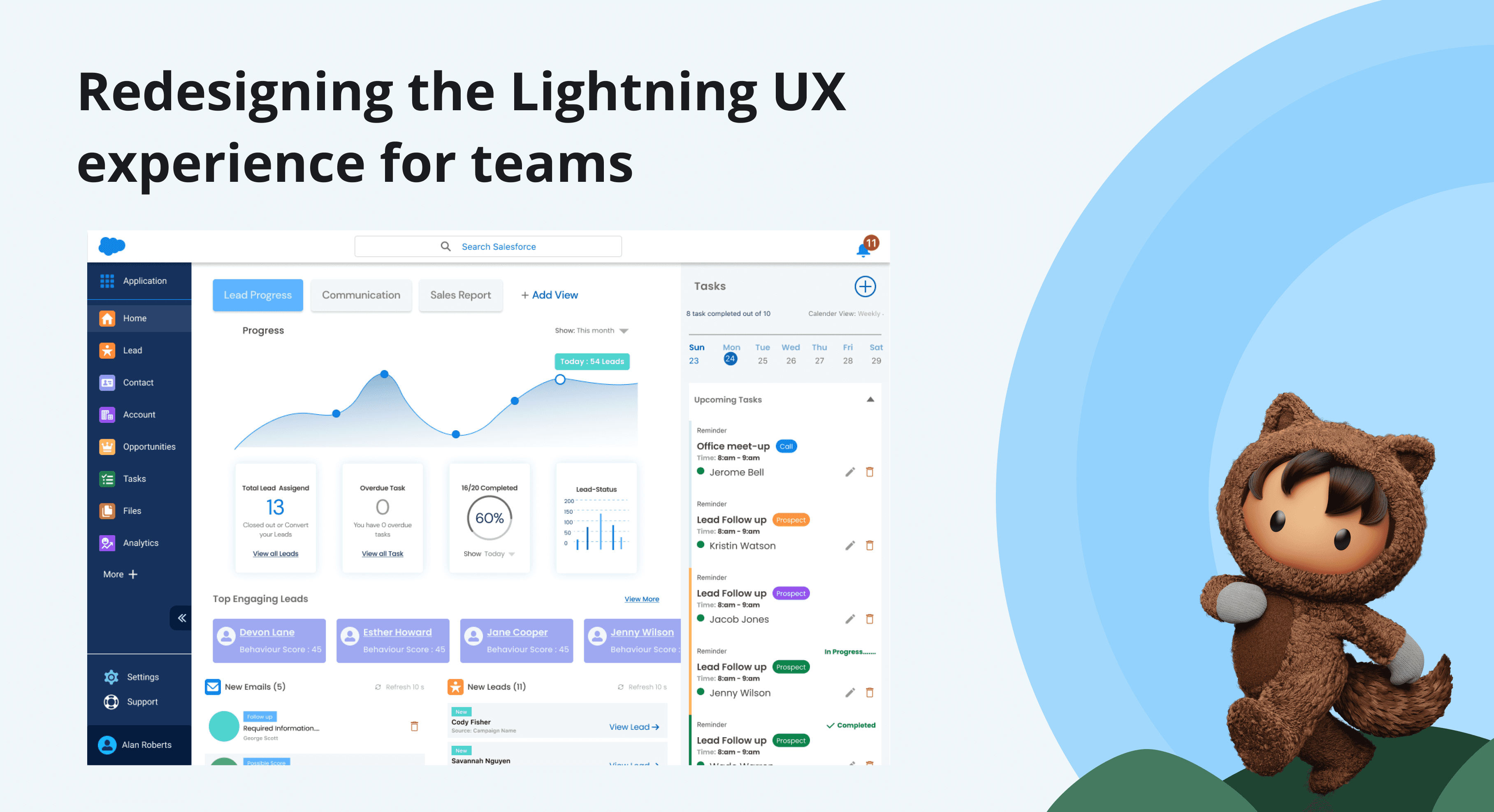
Salesforce made simple for cross-functional internal teams @ KCC
At KCC or Kimberly-Clark, I worked on Salesforce Lightning redesign, partnering with the design and research team to support initial user research and early design. Together, we identified friction in complex workflows and focused on making essential tools clearer and more intuitive.
TIMELINE
8 months
TEAM
4 UX Researchers
3 UX Designers
MY ROLE
Mainly research!
TOOLS
Figma,
FigJam,
Qualtrics,
FullStory, Microsoft Teams
DELIVERABLES
CRM Growth
30%
increased user workflow and efficiency
Growth Revenue
10%
opportunities generated growth revenue
User Satisfaction
20%
increased overall user satisfaction according to survey
CONTEXT
Salesforce + Kimberly-Clark Budding Partnernship
For over a decade, Kimberly-Clark Professional has partnered with Salesforce to streamline B2B operations, improve customer relationship management (CRM), and support data-driven decisions that enhance service and drive growth.
PROBLEM
A survey of 80 users revealed 119 pain points
that slowed down business operations
Over time, the CRM began failing the internal teams who relied on it. Security concerns, poor performance, and fragmented workflows made everyday work more difficult.
RESEARCH & DISCOVERY
I was brought on to help conduct research
Working with senior designers and researchers, we took a multi-phase approach to understand the system and how it affected the teams who relied on it.
Step 1: Understanding Salesforce Internal Structure
I started by immersing myself in the Salesforce ecosystem by understanding the app's current internal structure, business terminology, and key features.
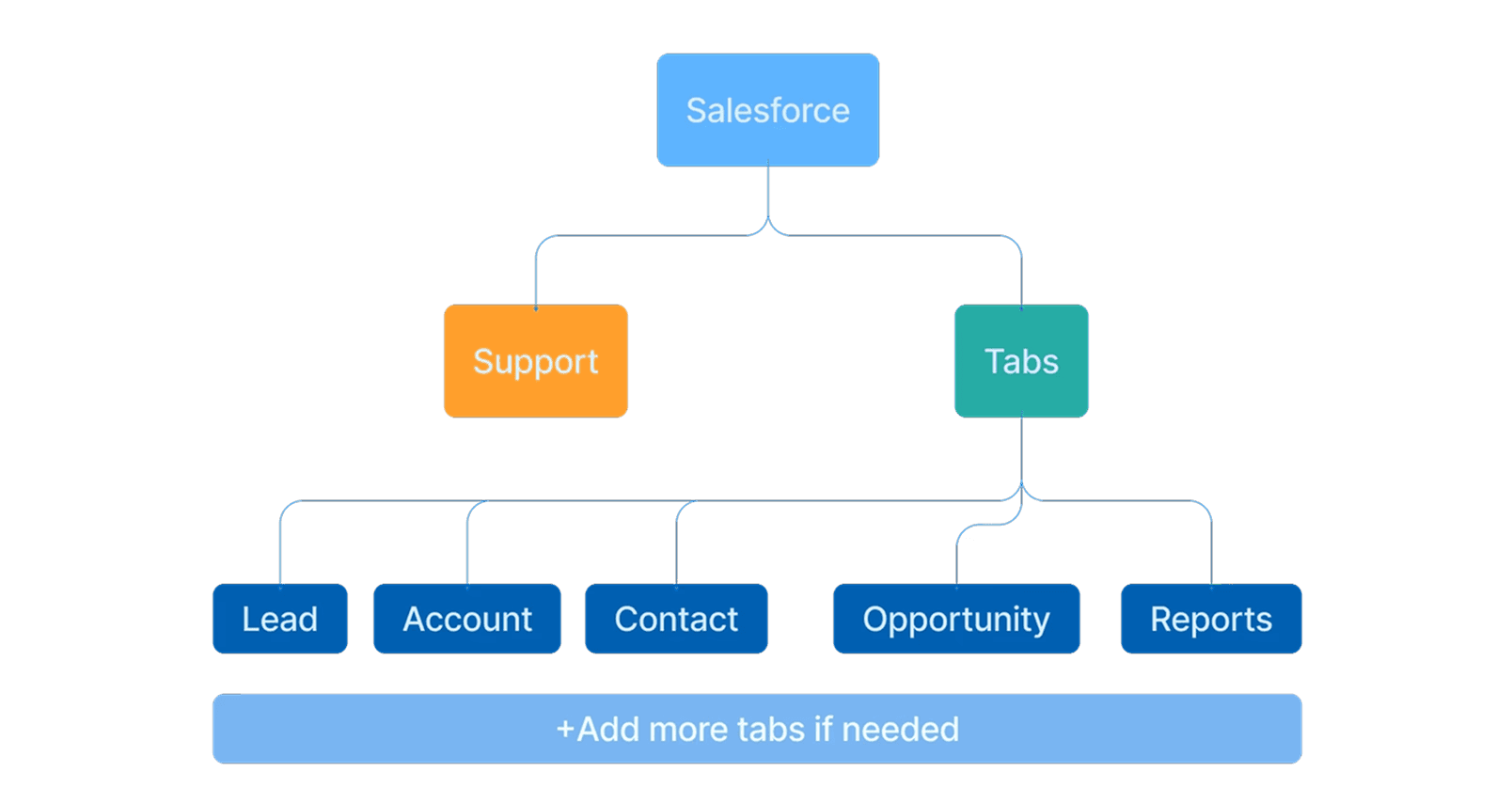
Salesforce Current Information Architecture
Step 2: Identify Our Users
I shadowed a senior designer and procured questions to ask 15+ digital sellers and field sellers to understand their specific workflows, pain points, and success metrics. These conversations revealed the differences between user types and their needs.
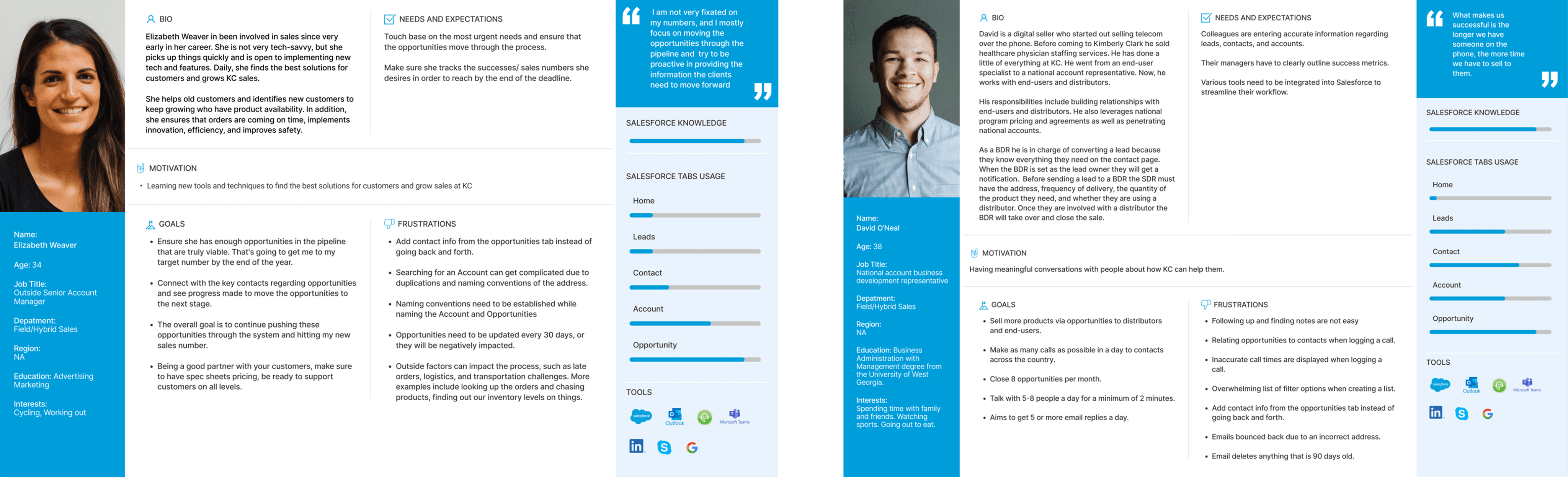
"I need the system to give me a complete customer history at a glance. When I'm visiting clients, I can't waste time clicking through screens."
-Field Seller
(5 years experience)
"Speed is everything for me. I handle 50+ calls a day. Every extra click costs me opportunities and slows down my conversion rate."
-Digital Seller
(10 years experience)
Step 3: A Day in the Life of Our Users (& their workflow)
As a team, we created CRM flow visualizations to identify obstacles in the current commercial process. This helped me understand where users were getting stuck, where inefficiencies existed, and where collaboration between teams was breaking down.
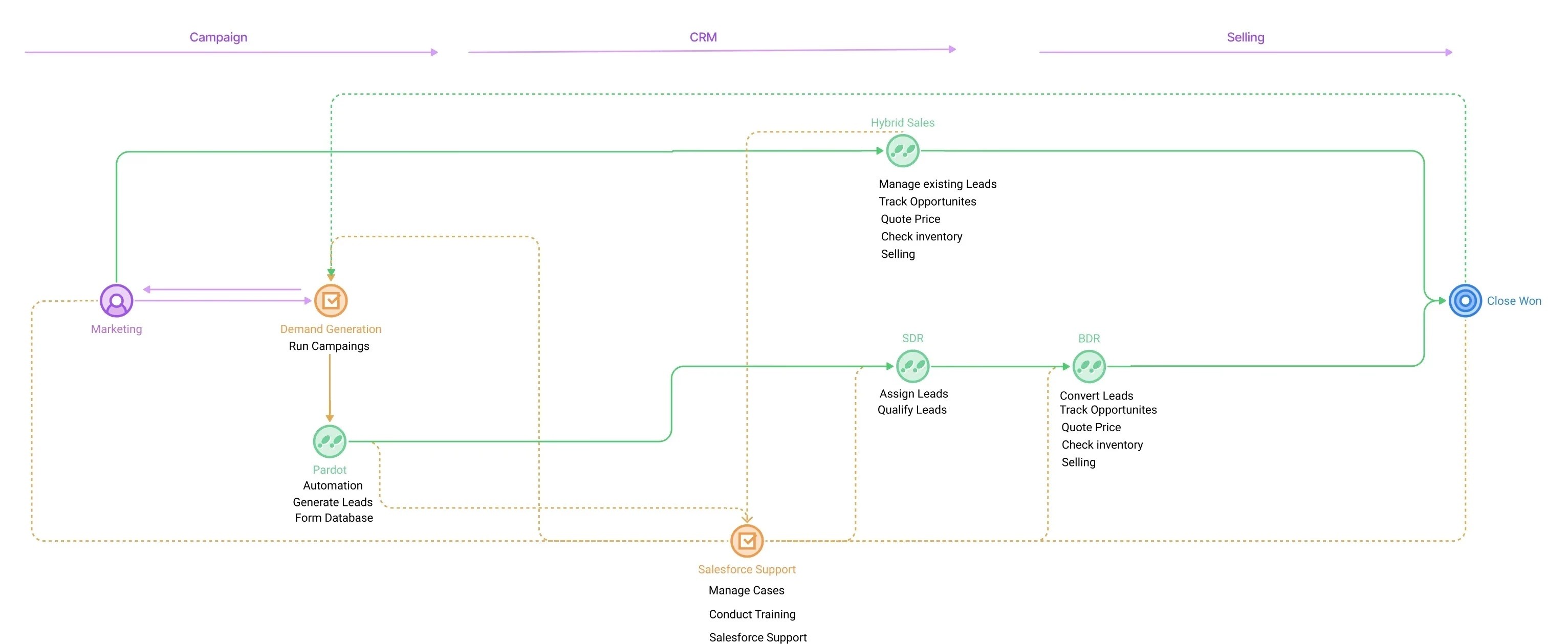
Mapping The Current User Flow
Step 4: Finding the Gaps In The Market
We studied how other companies handled communication and order management, uncovering market trends, customer expectations, and opportunities to stand out.

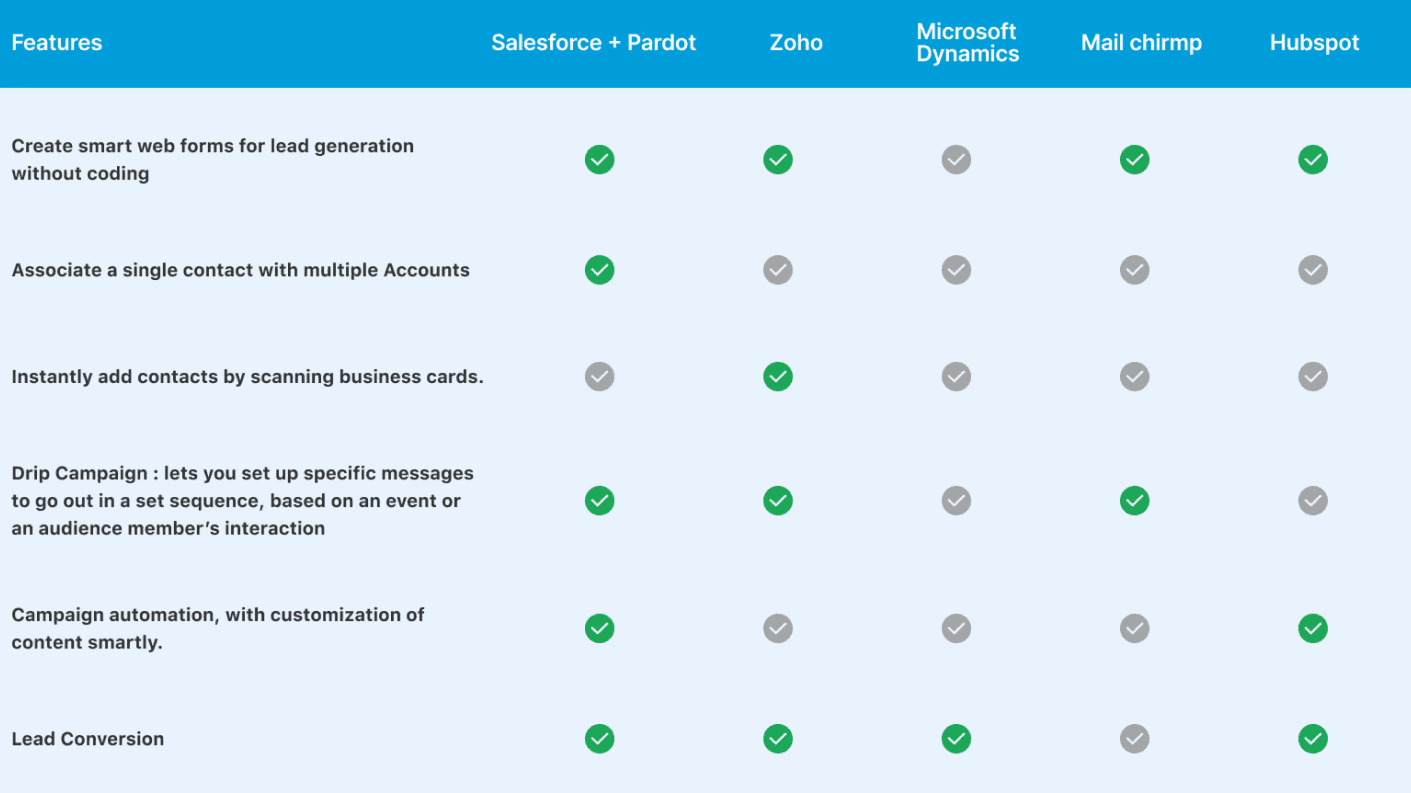
Salesforce Competitors
KEY INSIGHTS
Our Top Findings From Research
The research revealed insights that would shape the entire redesign. Here's what we discovered:
Insight #1
Filter is too complex and paralyzed users
Users faced overwhelming cognitive load when creating sales lists. This led to frequent mistakes and frustration.
Insight #2
Key Information Was Buried in the Navigation
Key information like follow-up reminders and customer order history was hidden deep in the navigation. Most users didn't even know these features existed.
Insight #3
Local solutions didn’t scale globally. Each region came with unique needs and challenges.
Europe needed GDPR compliance, Asia required multi-language support, and Latin America followed different approval hierarchies to where the rigid template couldn’t adapt.
DESIGN SOLUTION
Design decision informed by research
Each research insight directly informed a specific design decision. Here's how findings translated into solutions:
Research Insight
Design Solution
Insight #1
Filter is too complex and paralyzed users
Users faced overwhelming cognitive load when creating sales lists. This led to frequent mistakes and frustration.
Solution #1
Add Smart filtering with progressive disclosure
Display the top 5 most-used filters by default in the dashboard. Advanced options appear only when its needed.
Insight #2
Key Information Was Buried in the Navigation
Key information like follow-up reminders and customer order history was hidden deep in the navigation. Most users didn't even know these features existed.
Solution #2
Redesigning the Information Architecture
Most-accessed data promoted to primary views. Contextual panels show related information without navigation. Proactive reminder system on dashboard.
Insight #3
Local solutions didn’t scale globally. Each region came with unique needs.
Europe needed GDPR compliance, Asia required multi-language support, and Latin America followed different approval hierarchies to where the rigid template couldn’t adapt.
Solution #3
Build a flexible template system that adapts to each regions needs.
Core structure remains consistent, but regional customization is built-in. Compliance requirements integrated into workflows, not bolted on.
RELFECTION
— Understanding the Business Process as an intern
This project pushed me into unfamiliar territory with new terminology, roles, and systems. By asking questions and learning as I went, I became a more adaptable designer ready to work across the B2B industry.